Vapor Keys
Vapor Keys 1.0
Vapor Keys is a keyboard instrument for soft, dreamy, sunbaked electric piano sounds and ambient textures. It plays two sound layers together, adds a Sub layer underneath, and runs everything through two effect pedals: Vapor Dimension MK2 for movement and width, and Ethos Space for reverb and echo.
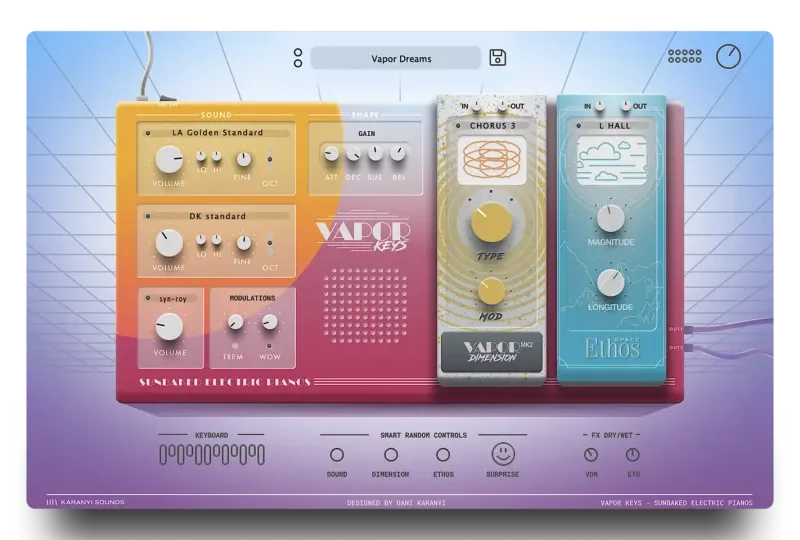
Everything is on one screen. You pick a preset, play, and shape the sound with a handful of big knobs.
What it is for
Section titled “What it is for”- Electric pianos and tines: warm, slightly worn keys with a vintage feel.
- Layered keys: blend two different sounds, set each level, and tune one of them up or down an octave.
- Ambient pads and soft textures: long attack and release times, a Sub layer and plenty of space.
- Lo-fi movement: add WOW and TREM for a wobbly, tape-style feel.
The window at a glance
Section titled “The window at a glance”| Area | What it does | Page |
|---|---|---|
| Preset bar (top center) | Shows the preset name. Step through presets or save your own | Controls |
| SOUND (two layer panels) | Two sound layers, each with VOLUME, LO, HI, FINE and OCT | Controls |
| Sub layer (small panel, bottom left) | A third sound that sits under the two main layers, with its own VOLUME | Controls |
| SHAPE | ATT, DEC, SUS and REL: how notes start and end | Controls |
| MODULATIONS | TREM and WOW | Controls |
| Vapor Dimension MK2 (pedal) | Chorus, echo, phaser and widener sounds with TYPE and MOD knobs | Effects |
| Ethos Space (pedal) | Reverb and echo spaces with MAGNITUDE and LONGITUDE knobs | Effects |
| SMART RANDOM CONTROLS | Random buttons: SOUND, DIMENSION, ETHOS and SURPRISE | Controls |
| FX DRY/WET | VDM and ETH knobs: how much of each pedal you hear | Effects |
Quick start
Section titled “Quick start”- Open Vapor Keys on a software instrument track and play some notes.
- Click the preset bar at the top, or use the two small circles next to it, to pick a sound. Vapor Dreams is a good first pick.
- Turn the VOLUME knobs of the two layers to balance them.
- Turn FINE, LO and HI to tune and brighten or darken a layer.
- Use ATT and REL in the SHAPE section for slower, softer notes.
- Turn the TYPE and MOD knobs on the Dimension pedal and MAGNITUDE and LONGITUDE on the Ethos pedal, and set VDM and ETH to taste.
- Want something unexpected? Press one of the random buttons.
Legacy Karanyi Sounds plugins like this one use serial number activation: see Activate legacy plugins.
Next: Controls
docs v0.0.14