The display
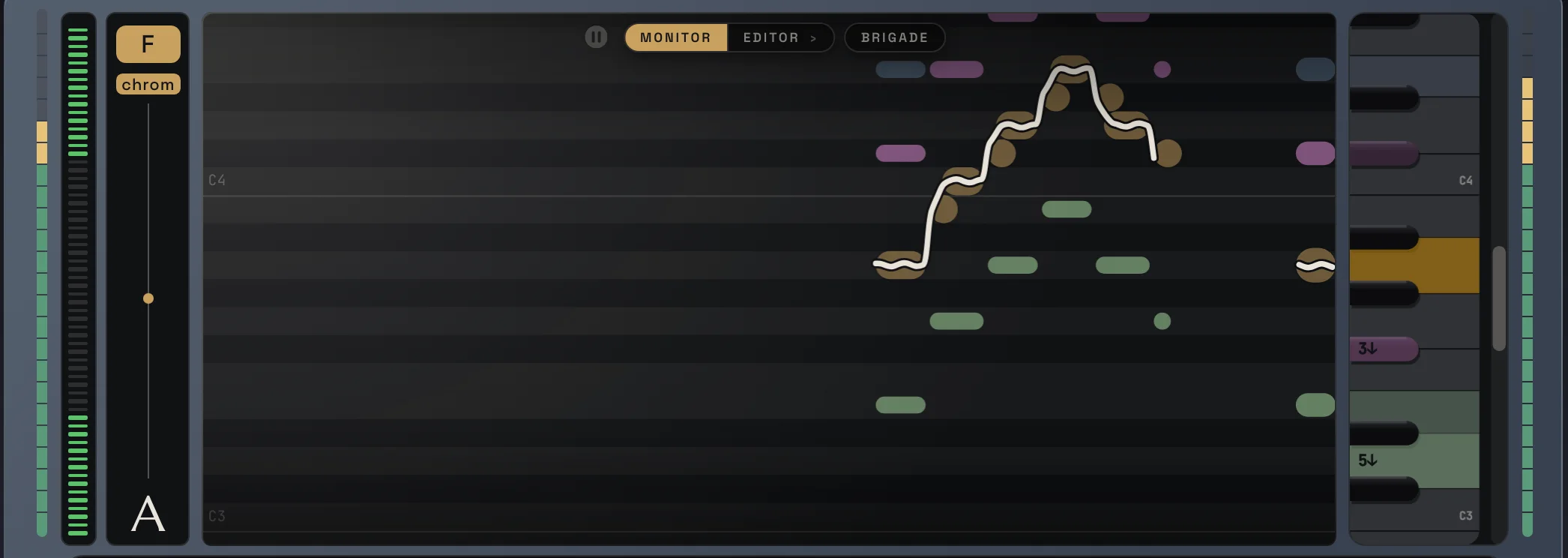
The big display in the middle shows what Voicemax hears and what it does with it.
Monitor
Section titled “Monitor”- Your voice runs as note blocks, with the tuned pitch as a white line on top.
- The harmonies are the colored lines, one color per voice.
- On the left: the key and scale chips, the Tune Amount bar and the note you are singing. See Lead tuning.
- On the right: a piano. The harmony voices sit on it as colored chips, so you see which notes they sing.
The buttons at the top switch the display between MONITOR, the EDITOR (Lead and Voices) and the BRIGADE.
The piano
Section titled “The piano”- Drag a colored chip to another key to change that harmony voice. Drop it off the piano to switch the voice off.
- Click a key to turn that note off or on. The lead is only tuned to notes that are on. Use it to remove a note from the scale that the singer keeps landing on by mistake.
The pause button next to MONITOR holds the picture and the key colors. While it is paused you can drag the harmony chips on the piano in peace. Click it again to go live.
Moving around
Section titled “Moving around”- Scroll: move up and down through the octaves.
- ⌘ + scroll or pinch (Mac), Ctrl + scroll (Windows): zoom.
- Drag the roll or the piano keys: pan.
Next: Lead Editor
docs v0.0.5