Cloudmax Breeze
Cloudmax Breeze 1.0
Cloudmax Breeze finishes a raw vocal with one knob. Behind that knob runs the chain a mix engineer would build by hand: a room around the voice, a brighter and clearer top end, warm analog-style saturation, and a glue compressor that levels the dynamics. The saturation runs on a neural network model.
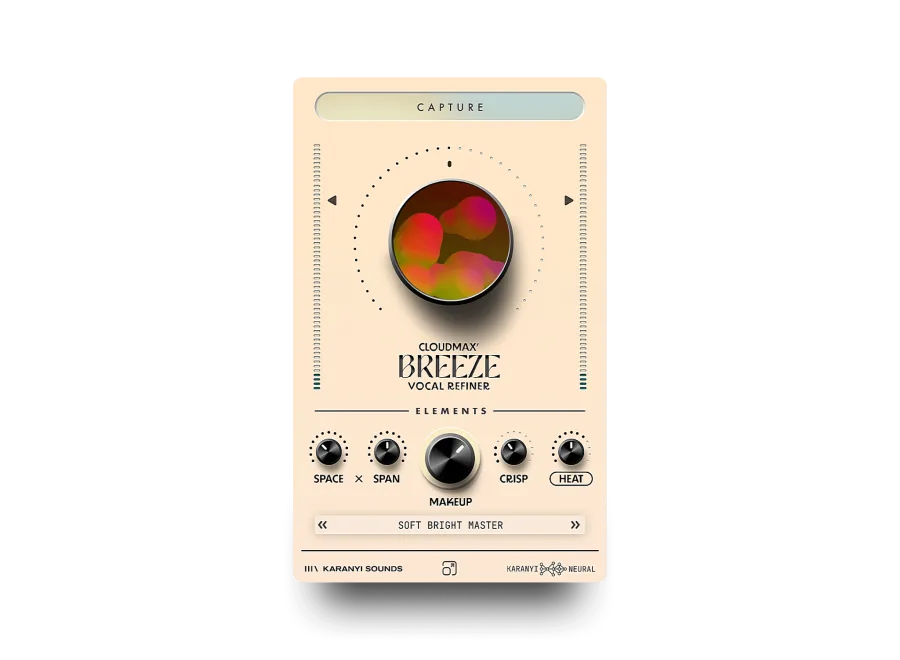
You don’t need to know how to set up a reverb or a compressor. Click CAPTURE, turn the big Breeze knob, done. When you want more control, the five Elements knobs below let you shape each stage.
What it is for
Section titled “What it is for”- Quick vocal polish: a demo or a rough vocal that should sound “finished” in seconds.
- Rap and spoken word: presence, bite and a short space without washing the words out.
- Singers and ballads: a lush room and warmth for long, held notes.
- Choirs and backing vocals: glue and air for stacks.
- Podcast and voice-over: clarity and even levels.
The window at a glance
Section titled “The window at a glance”From top to bottom:
| Area | What it does | Page |
|---|---|---|
| CAPTURE (top bar) | Listens to your vocal and sets a starting point for it | Controls |
| Breeze knob (big knob in the middle) | One knob for the whole chain, from subtle polish to full effect | Controls |
| Output meters (left and right edges) | Output level, with a fader on each side | Controls |
| Elements (five knobs) | Space, Span, Makeup, Crisp and Heat, one knob per stage | Controls |
| Preset bar | Step through presets or open the preset manager | Presets |
| Bottom bar | Karanyi Sounds website link and window size | Controls |
Quick start
Section titled “Quick start”- Put Cloudmax Breeze on your vocal track as an insert.
- Play the vocal and click CAPTURE. Breeze listens for a few seconds and sets itself up for this voice.
- Turn the big Breeze knob. Start around 30–50 % and listen. Further right means more room, more brightness and more saturation.
- Use Makeup to bring the vocal forward and even out the level.
- Not sure where to start? Pick a preset from the preset bar at the bottom.
Next: Controls
docs v0.0.5