Lead tuning
The lead is your main vocal, the voice you sing into the plugin. Voicemax listens to it, finds the closest note in your key and pulls the voice onto it. How hard and how fast it pulls is up to you.
Key and scale
Section titled “Key and scale”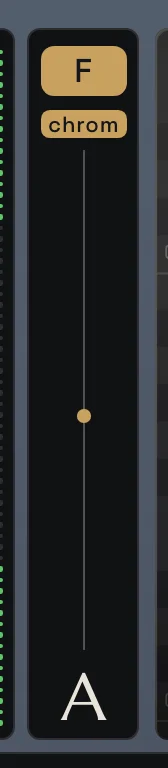
The column on the left of the display sets the musical ground for everything else.
- Top chip: the key of your song (A to G#).
- Lower chip: the scale. Major and Minor cover most songs. You also get harmonic and melodic minor, the pentatonics, Blues and the modes (Dorian, Phrygian, Lydian, Mixolydian, Locrian).
- Chromatic: every note is allowed. The voice still gets tuned, but only to the nearest semitone. Handy when you don’t know the key yet.
- The striped bar is a shortcut for Tune Amount. Drag it up or down.
- The big letter at the bottom is the note you are singing right now.
The key and scale also drive the harmonies: in Scale mode every harmony voice stays on the notes of this scale.
Tune Amount
Section titled “Tune Amount”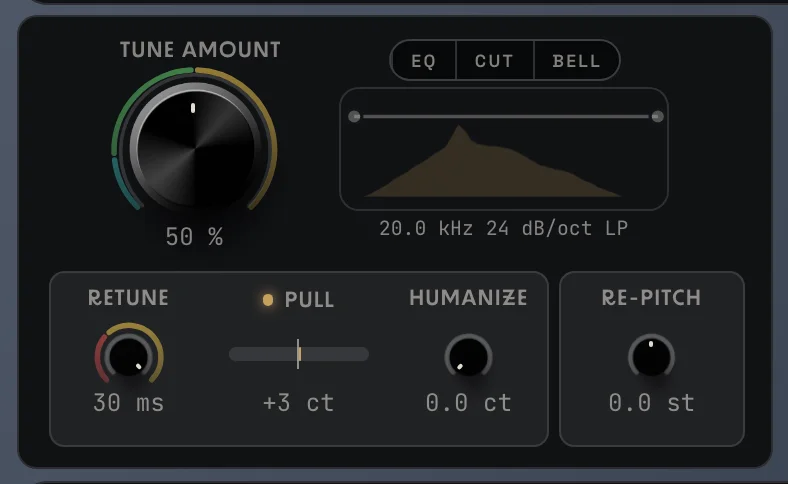
The big knob on the Lead Tuning card. It sets how hard the lead is pulled to the right note. The ring around it has three colored zones:
| Setting | What you hear | Good for |
|---|---|---|
| 0 % | The lead is not tuned at all. | Keeping the raw take while still using the harmonies. At 0 % the harmonies follow the lead freely, at a fixed distance. From 1 % up they lock to the key. |
| 1–15 % (teal) | A light touch. Only notes that are clearly off get nudged. | Singers who are mostly in tune, acoustic and live-feel songs. |
| 15–50 % (green) | Transparent correction. Off-pitch notes are pulled in, the natural slides and vibrato stay. | Most pop, R&B and singer-songwriter vocals. |
| 50–100 % (yellow) | Every note is pulled onto the right pitch more and more firmly, in steps. | Modern pop, trap, hyperpop, the obvious “tuned” sound. |
Retune
Section titled “Retune”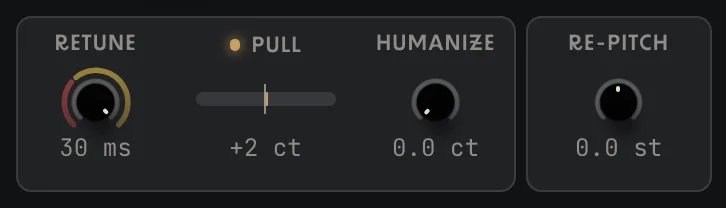
How fast a note snaps to its target, from 0 to 30 ms.
- 30 ms (default): smooth, the voice glides into the note.
- 10–30 ms (yellow): tighter, the tuning starts to be heard.
- Below 10 ms (red): the stepped, robot-like hard tune. Notes jump from one to the next with no slide.
For the classic hard-tune effect set Tune Amount to 100 % and Retune to 0–5 ms.
Pull and Key Fit meter
Section titled “Pull and Key Fit meter”The small meter between Retune and Humanize shows what the tuning is doing. It does not change the sound.
- PULL: how many cents (hundredths of a semitone) the tuning is pulling right now, and in which direction. A big number means the singer is far from the note.
- KEY FIT: click the meter’s title to switch to it. It shows how much of what you sing falls on the key and scale you chose, averaged over about 10 seconds. Under it you see how far you are from the nearest scale note on average. A low Key Fit usually means the wrong key or scale is set.
The small lamp before the title turns the meter on or off.
Humanize
Section titled “Humanize”Adds a slow, random drift to the tuned pitch, up to ±50 cents. At 0 it is off. A little Humanize (5–15 ct) takes the edge off a very firm tune and makes it sound less like a machine.
Re-Pitch
Section titled “Re-Pitch”Shifts the whole lead up or down by up to 12 semitones. This is an effect, not a correction: it changes the whole character of the voice.
- +12 st: chipmunk, cartoon, high-pitched FX.
- −12 st: deep, monster, slowed-down voice.
- Great for creative effects, ad-libs, narration and spoken word.
Leave it at 0 st for normal tuning.
Lead EQ
Section titled “Lead EQ”A small EQ that sits on the tuned lead only. The same EQ is on the Voices card for the harmonies. The EQ button turns it on, CUT and BELL pick the mode.
- CUT: drag the two dots to set a low cut and a high cut. Right-click a dot to change how steep it is (from 6 dB/oct up to a brick wall). The easiest way to remove rumble, pops and harsh highs.
- BELL: drag the middle dot down to dip the mids. It makes the vocal silkier and less boxy.
Next: Harmonies
docs v0.0.5