Minipol
Minipol 1.0
Minipol is a compact virtual analog synth. Four oscillators, a noise source and a sub oscillator feed one filter, two envelopes and two LFOs. A row of five effects (filter, delay, chorus, tone and space) finishes the sound. Everything sits on one screen, so you can see the whole signal path at once.
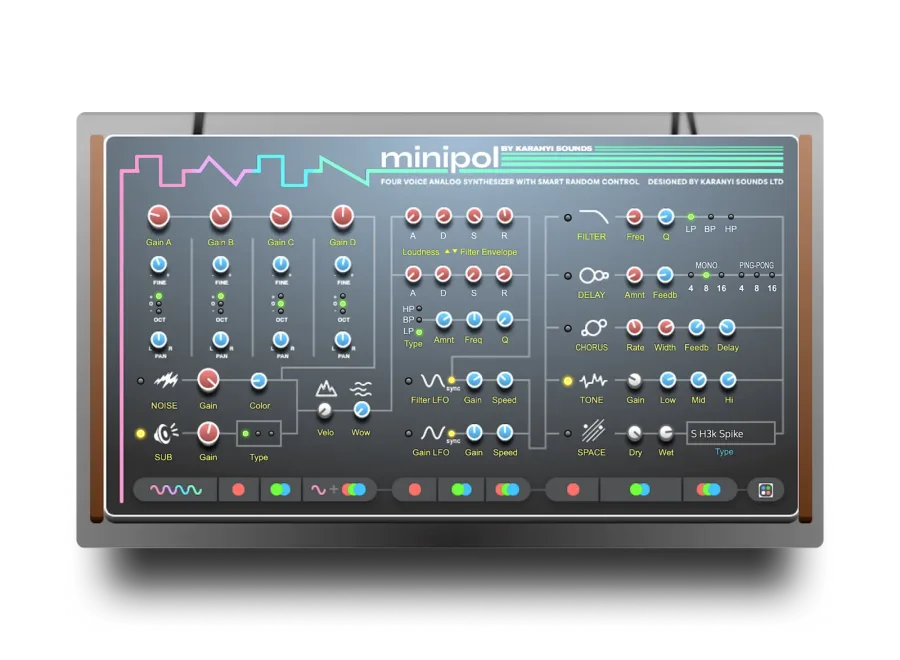
The row of Smart Random buttons along the bottom gives you new sounds in one click: randomize only the oscillators, only the envelopes, only the effects, or everything. Minipol Plus comes with a large preset library, and two add-on packs called Rapture and Badlands.
What it is for
Section titled “What it is for”- Keys and plucks: warm, simple synth keys with a short envelope.
- Pads and soundscapes: slow attack and release, the LFOs on the filter and the volume, and a big space.
- Bass: the sub oscillator and a low filter.
- Leads and sequences: bright waveforms with the delay in ping-pong mode.
- Sound design: noise, wow and the Smart Random buttons for sounds you would not plan.
The window at a glance
Section titled “The window at a glance”| Area | What it does | Page |
|---|---|---|
| Header bar (top) | Window size, About, preset bar, settings and master volume | Controls |
| Four oscillator columns (top left) | Waveform, Gain, Fine tune, octave and Pan for oscillators A to D | Controls |
| Noise and Sub (bottom left) | A noise source and a sub oscillator | Controls |
| Velo and Wow | Velocity response and wow | Controls |
| Loudness and Filter Envelope (middle) | Two ADSR envelopes | Controls |
| Filter (middle) | Low-pass, band-pass or high-pass filter with Amount, Freq and Q | Controls |
| Filter LFO and Gain LFO | Two LFOs: one on the filter, one on the volume | Controls |
| FILTER, DELAY, CHORUS, TONE, SPACE (right) | Five effects in a row | Controls |
| Smart Random buttons (bottom) | New values for a whole section, or for everything | Controls |
Quick start
Section titled “Quick start”- Load Minipol on a MIDI or instrument track. The first time, the plugin asks for your serial number: see Activate legacy plugins.
- Click the name in the preset bar at the top and pick a preset. Start with a category that matches your idea, for example Keys, Pads or Bass.
- Play some notes. Turn the Freq knob in the Filter section and the A D S R knobs of the Loudness envelope to shape the sound.
- Turn on DELAY or CHORUS in the effects column on the right and set the Space reverb to taste.
- Want something unexpected? Click the last button on the right of the bottom row (the four-dot button) to randomize everything, then save what you like.
Next: Controls
docs v0.0.14