Technocolor
Technocolor 1.0
Technocolor is a saturation effect inspired by vintage samplers and tape machines. Its tagline says it all: Saturation. Bitcrush. Exciter. Behind the simple front panel there is a collection of sound algorithms (drive, tape, radio, bit crushing, filters and more). You pick one, then shape it with a single big TONE knob.
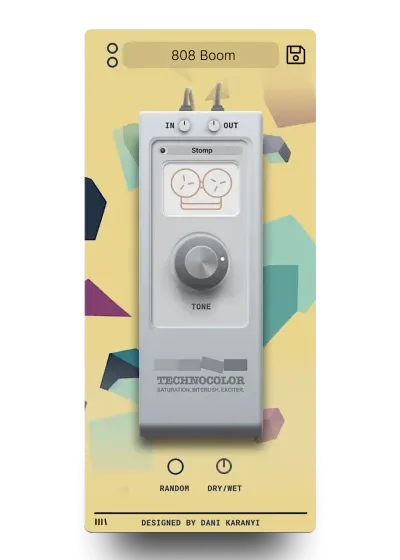
The window is small and fixed. You get IN and OUT level knobs, the big TONE knob, a DRY/WET knob, a RANDOM button and a preset bar at the top. Nothing else to dig through.
What it is for
Section titled “What it is for”- Drums: add grit, bottle-like texture, radio tone or a bit of crush on top.
- Bass: warm saturation, amp-style drive or heavy distortion.
- Guitars: a warmer sound, a small-speaker sound, or gentle bit saturation.
- Synths and samples: lo-fi character, extra bass, or bright top texture.
The window at a glance
Section titled “The window at a glance”| Area | What it does | Page |
|---|---|---|
| Preset bar (top) | Shows the current sound, with arrows to step through and a save button | Presets |
| IN | Input level, before the effect | Controls |
| OUT | Output level, after the effect | Controls |
| Display | Shows the animated tape reels | Controls |
| TONE | The big knob. It moves the sound of the selected algorithm from mild to extreme | Controls |
| RANDOM | Picks a new sound for you | Controls |
| DRY/WET | Mix between your original sound and the effect | Controls |
Quick start
Section titled “Quick start”- Put Technocolor on a track as an insert.
- Click the preset bar at the top and pick a sound. The names start with the source they suit, such as DRUM, BASS, GUITAR or SYNTH.
- Play your audio and turn the big TONE knob. This is the main control.
- Use DRY/WET to blend the effect in parallel with your original sound.
- If the level jumps, adjust IN and OUT.
- Want an idea? Press RANDOM.
Next: Controls
docs v0.0.14