Midnite
Midnite 1.0
Midnite is a hybrid instrument that fuses granular texture with analog warmth. It stacks four sound modules, each with its own filter, LFO, envelope, drive, delay and reverb send, and adds a sub oscillator, a granular Texture section, a Reverb and a Delay on top. The result is wide, cinematic guitar atmospheres, from soft pads to heavy bass and lead sounds.
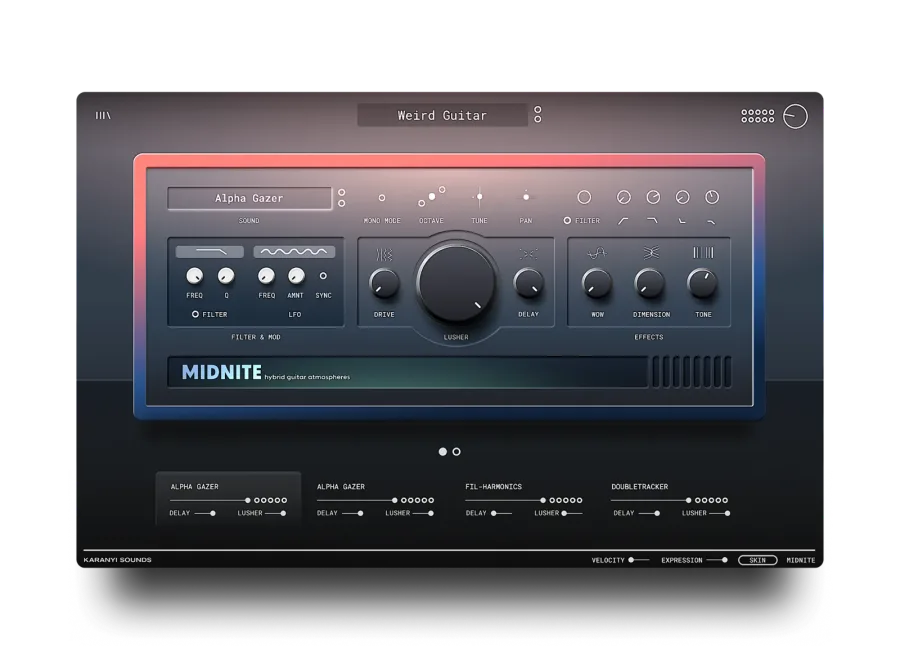
The main panel shows one module at a time. The row of four tabs below it switches between the modules and mixes them. A second page holds the shared effects: sub, delay, texture, reverb, tone, glue and the randomizer.
What it is for
Section titled “What it is for”- Pads and soundscapes: slow, layered textures that fill a scene.
- Drones: long, evolving sounds with the Texture and Reverb sections.
- Bass and mono leads: tight sounds with Mono Mode, Drive and the filter.
- Keys and guitar-like sounds: play the layers together or one by one.
The window at a glance
Section titled “The window at a glance”| Area | What it does | Page |
|---|---|---|
| Preset bar (top) | Step through presets or open the preset manager | Presets |
| Sound, Mono Mode, Octave, Tune, Pan | Choose the sound of the module and set its pitch and position | Controls |
| Envelope (top right) | Attack, decay, sustain and release for volume or filter | Controls |
| Filter and Mod | A filter and an LFO that moves it | Controls |
| Lusher, Drive, Delay | Sends to the Lusher section and the delay, and a drive | Controls |
| Effects | Wow, Dimension and Tone for each module | Controls |
| Module bar (bottom) | Four module tabs with level and send faders | Controls |
| Master effects page | Sub, Delay, Lusher (Texture and Reverb), Master Tone, Glue, Randomizer | Controls |
| Top right | Level dots and the master volume knob | Controls |
Quick start
Section titled “Quick start”- Load Midnite on an instrument track.
- Pick a preset from the preset bar at the top.
- Click the four tabs in the module bar to hear how the layers are built. Move a module fader down to take it out of the mix.
- On the main panel, turn Lusher up for texture and reverb, and Delay for echoes.
- Click the two small dots under the main panel to open the master effects page and shape the whole sound.
- Want an idea? Click ALL in the Randomizer.
Next: Controls
docs v0.0.14