Polyscape Nova
Polyscape Nova 1.0
Polyscape Nova is an instrument for evolving soundscapes, dynamic pads and rhythmic textures. It fuses string instruments with modern synthesis: you pick a sound for each of four modules, shape every one with its own filter, envelope and effects, and blend them with a single Morph control. A sub synth adds weight underneath, and a shared Harmonic Delay and Lusher section (grain texture and reverb) puts everything in one space.
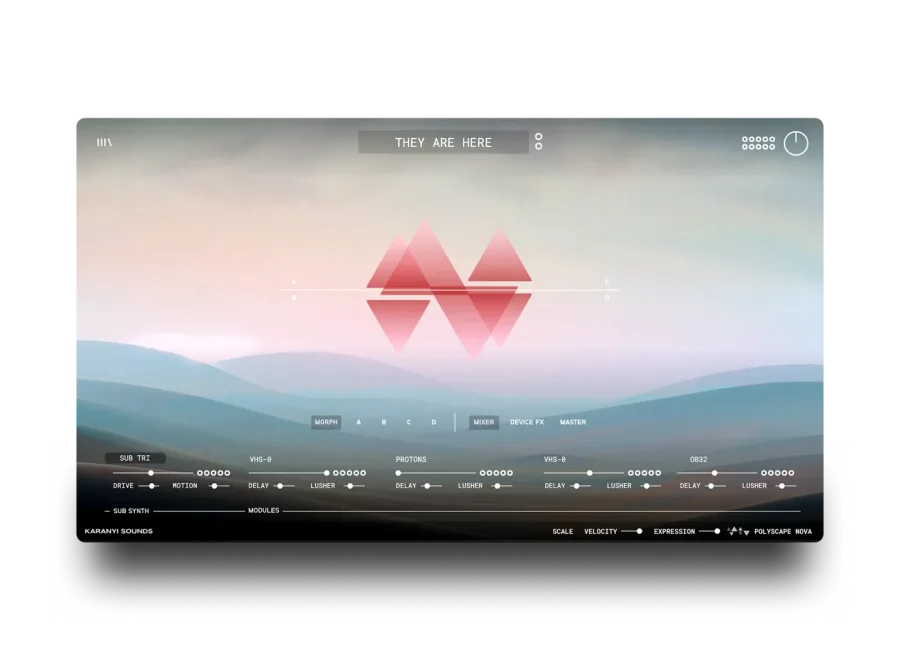
Polyscape Nova comes as VST3 and AU. Every module has its own sound, so a patch can be a simple pad or a layered movement of four different sources.
What it is for
Section titled “What it is for”- Pads and ambient beds: long envelopes, a little Lusher and slow Morph moves.
- Evolving soundscapes: Morph between two pairs of modules while the filter LFOs and the Wow keep things moving.
- Rhythmic textures: the Harmonic Delay in note values, plus the Texture grains.
- Cinematic keys and leads: a string-based source with drive, a filter and a short release.
- Low end: the sub synth and the Xtra Bass presets.
The window at a glance
Section titled “The window at a glance”| Area | What it does | Page |
|---|---|---|
| Preset bar (top, middle) | Name of the preset, arrows to step through them, click to open the preset browser | Presets |
| Level dots and master knob (top right) | Output level display and master volume | Controls |
| Morph artwork (center) | Blends modules A and B with modules C and D | Controls |
| Tabs (MORPH, A, B, C, D) | Switch between the Morph screen and the four module panels | Controls |
| Tabs (MIXER, DEVICE FX, MASTER) | Switch the bottom bar | Controls |
| Mixer bar | Sub synth and the four modules: level, Delay and Lusher amounts | Controls |
| Module panel (A to D) | Sound, gain, pan, octave, tune, filter, LFO, envelope and effects of one module | Modules |
| Device FX bar | Harmonic Delay, Texture and Reverb, shared by all modules | Effects |
| Master bar | Filter, EQ and glue compressor on the whole output, and the Smart Random buttons | Effects |
| Bottom row | Window size, Velocity and Expression | Controls |
Quick start
Section titled “Quick start”- Load Polyscape Nova on an instrument track and play some notes.
- Open the preset browser with the preset bar and pick a Collection, a Style and a preset. Start with something in Soundscapes.
- Move the Morph control to hear modules A and B turn into C and D.
- Click the tab A to open the first module. Try another Sound with the small arrows, then change the Attack and Release.
- Open DEVICE FX and turn the Harmonic Delay and Lusher amounts up on the MIXER bar for more space.
- Want a surprise? Open MASTER and press ALL in the Smart Random section.
Next: Controls
docs v0.0.14