Polyscape Analog
Polyscape Analog 1.0
Polyscape Analog is a multi-layer synthesizer built around rare analog and modular synth sounds. You stack four layers (A, B, C and D), add a sub synth, and blend the layers with one big knob. Every layer has its own filter, envelopes, drive and phaser, and the whole instrument runs through a delay, a reverb and a master section.
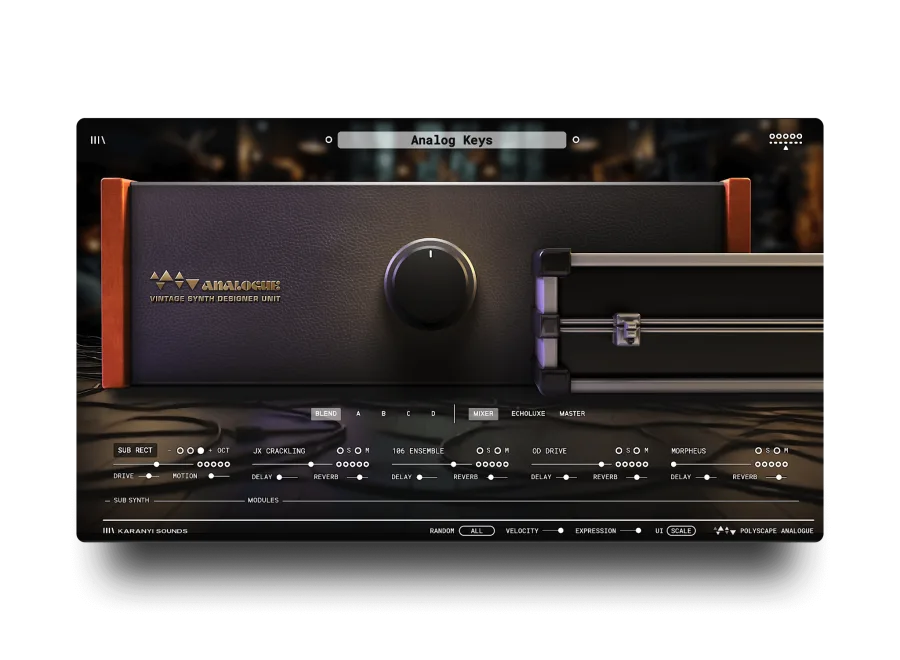
Pick a sound for each layer from a list of 25 synth models, shape it, and mix the layers together. The BLEND page gives you one knob that fades between layers A and B and layers C and D, so a single move changes the whole character.
What it is for
Section titled “What it is for”- Keys and pads: wide, warm layers from vintage polysynths and string machines.
- Basses and leads: mono or poly layers with drive, filter envelopes and a sub synth underneath.
- Soundscapes: four layers, slow envelopes, phaser and reverb.
- Quick ideas: the RANDOM buttons pick new sounds, envelopes, delay and reverb for you to start from.
The window at a glance
Section titled “The window at a glance”| Area | What it does | Page |
|---|---|---|
| Preset bar (top) | Step through presets or open the preset manager | Presets |
| BLEND | One big knob that fades between layers A and B and layers C and D | Controls |
| A, B, C, D | The four layers: sound, envelopes, filter, LFO, drive, phaser, tuning | Controls |
| MIXER | Level, solo, mute, delay send and reverb send for every layer, plus the sub synth | Mixer and effects |
| ECHOLUXE | The delay and the reverb | Mixer and effects |
| MASTER | Master filter, tone, glue compressor and the randomizer | Mixer and effects |
| Bottom bar | Random, Velocity, Expression, UI scale | Controls |
Quick start
Section titled “Quick start”- Load Polyscape Analog on an instrument track.
- Pick a preset from the preset bar at the top. Start with the category that fits: Bass, Keys, Leads, Pads or Soundscapes.
- Click BLEND and turn the big knob to fade between the two pairs of layers.
- Click A, B, C or D to open a layer and change its sound, envelope, filter or drive.
- Click MIXER to balance the layers and the sub synth, and ECHOLUXE for delay and reverb.
- Want something new? Click RANDOM ALL in the bottom bar.
Next: Controls
docs v0.0.14