Playmod
Playmod 1.0
Playmod is a wild, creative FX toy that transforms your sound into something new. It is a small rack of three effect modules (an amp and saturation unit, a reverb and a modulation unit) plus a playback machine that adds the noise and wear of vinyl, tape, cassette or digital gear. Everything is one click or one knob away, so you can play with it instead of programming it.
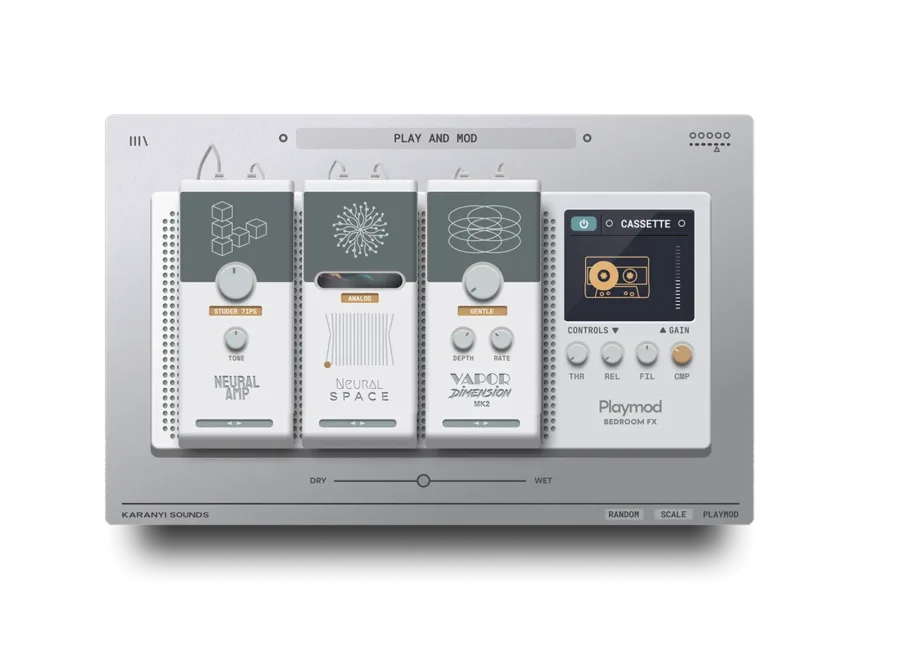
You can drag the three modules into any order, switch each one off on its own, and press RANDOM to try something you did not plan.
What it is for
Section titled “What it is for”- Keys, leads and pads: vintage tape tone, old-radio character, wide chorus and space.
- Drums: driven, crushed or retro sounds, with vinyl or cassette noise underneath.
- Guitars and bass: amp-style drive and a touch of lo-fi grit.
- Vocals: from light reverb to crushed and robotic.
- Sound design: extreme settings, big spaces and broken digital textures.
The window at a glance
Section titled “The window at a glance”| Area | What it does | Page |
|---|---|---|
| Neural Amp (left module) | Drive, tone and six amp and tape models | Controls |
| Neural Space (middle module) | Reverb with an XY pad, Analog or Digital mode and a Learn button | Controls |
| Vapor Dimension MK2 (right module) | Chorus-style width and movement in four modes | Controls |
| Playback machine (right panel) | Noise and wear of six playback devices, with THR, REL, FIL and CMP knobs | Controls |
| Dry / Wet slider | The balance between your sound and the effect | Controls |
| Top right | Output level slider and level dots | Controls |
| RANDOM and SCALE (bottom right) | A new random sound, and a larger window | Controls |
| Preset bar (top) | Step through presets or open the preset manager | Presets |
Quick start
Section titled “Quick start”- Put Playmod on a track as an insert.
- Pick a preset from the bar at the top. Start with something close to your source: Keys, Drums, Guitars, Vocals or Sound Design.
- Turn the Dry / Wet slider to set how much effect you hear.
- Click the model name on the Neural Amp to step through its sounds, and turn the big knob for more drive.
- Click the name in the playback machine (for example CASSETTE) to change the kind of noise and wear.
- Want something unexpected? Click RANDOM.
Next: Controls
docs v0.0.14