Poly Space
Poly Space 1.0
Poly Space is an ambient reverb and space effect. It combines algorithms (reverb, echoes, modulation and filters working together) with impulse responses (recordings of real and classic reverb spaces). The result is a big, smooth space that you shape with just two knobs.
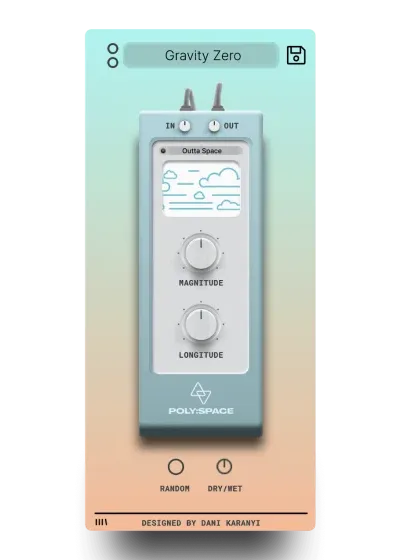
The window is a small pedal. MAGNITUDE decides how much space you hear. LONGITUDE decides how long and far it stretches. Behind these two knobs, every preset is a carefully built chain of effects, so a small turn can change a lot.
Poly Space is available as VST3 and AU.
What it is for
Section titled “What it is for”- Vocals: soft halos, small plates and wide ambient tails.
- Guitars and keys: plates, rooms and long dreamy spaces.
- Drums and percussion: tight rooms, gated and reverse spaces, slap echoes.
- Synths and sound design: huge, dense, shimmering or strange spaces.
The window at a glance
Section titled “The window at a glance”| Area | What it does | Page |
|---|---|---|
| Preset bar (top) | Name of the current preset, step buttons and the save icon | Presets |
| IN / OUT | Input and output level | Controls |
| Display | Shows the name of the current algorithm | Controls |
| MAGNITUDE | How much space you hear | Controls |
| LONGITUDE | How long and far the space reaches | Controls |
| RANDOM | A new random sound | Controls |
| DRY/WET | Balance between your sound and the effect | Controls |
Quick start
Section titled “Quick start”- Put Poly Space on a track as an insert, or on a send or return track.
- Open the preset bar at the top and pick a preset. Try Default first, then step through the others with the two small circles.
- Turn MAGNITUDE to set how much space you hear.
- Turn LONGITUDE to make the space shorter or longer.
- Use DRY/WET for the final balance. On a send or return track, turn it fully up.
- Found a sound you like? Click the save icon and give it a name.
Next: Controls
Poly Space is a classic Karanyi Sounds plugin. For activation, see Legacy activation.
docs v0.0.14