Matra
Matra 1.0
Matra is an echo effect inspired by analog hardware. It runs two delay engines side by side, each with resonant filters, and adds drive, saturation, tape-style movement and a special Wash control that blends a touch of reverb and grain into the echoes. The result is a delay that does not just repeat your sound: it shapes it.
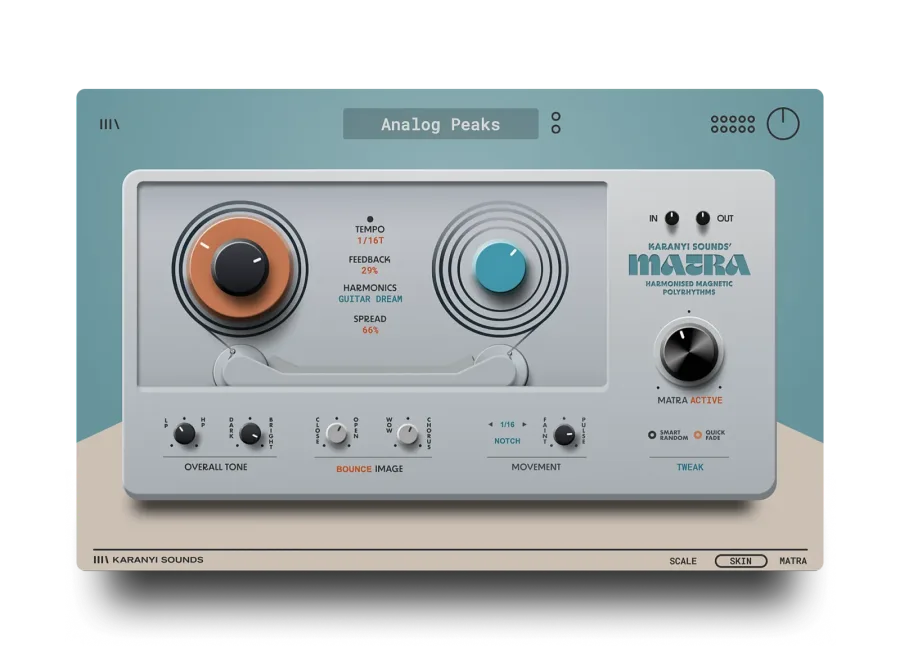
The front panel keeps the important things within reach: the Feedback and Tempo knobs, the Harmonics modes that set the character of the echoes, Spread for the second delay engine, and a few tone and movement controls. Press TWEAK to open the back panel for deeper control.
What it is for
Section titled “What it is for”- Vocals: warm, filtered echoes that sit behind the voice instead of on top of it.
- Guitars and keys: tape-style echoes with wow, chorus and saturation.
- Drums and percussion: short, bright rhythmic repeats and polyrhythmic patterns.
- Sound design: long, dark or self-feeding delays, with the LFO moving the filters.
The window at a glance
Section titled “The window at a glance”| Area | What it does | Page |
|---|---|---|
| Big knob with the orange ring | Outer knob: Feedback. Inner knob: Tempo | Controls |
| Center display | Tempo, Feedback, Harmonics and Spread readouts | Controls |
| Turquoise knob | Spread: the second delay engine | Controls |
| Overall Tone | A low-pass/high-pass knob and a dark/bright knob | Controls |
| Image | Stereo width and Wow/Chorus | Controls |
| Movement | An LFO that moves the filters inside the delay | Controls |
| Big knob on the right | Dry/wet of the whole plugin, with the Matra Active switch under it | Controls |
| Smart Random, Quick Fade, Tweak | Instant ideas, a quick tail fade, the back panel | Controls |
| Preset bar (top) | Step through presets or open the preset manager | Presets |
Quick start
Section titled “Quick start”- Put Matra on a track as an insert, or on a send or return track.
- Pick a preset from the preset bar at the top. Start with something close to your source: Vocal, Keys, Guitars, Drums or Sound Design.
- Turn the inner knob (Tempo) until the echoes sit in the groove, and the outer knob (Feedback) for the number of repeats.
- Click the Harmonics name in the center display to step through the character modes.
- Use the big knob on the right to set how much echo you hear.
- Want something unexpected? Click SMART RANDOM.
Next: Controls
docs v0.0.14