Controls
Brigade menu
Section titled “Brigade menu”The menu on the right side of the stage holds every sound control.
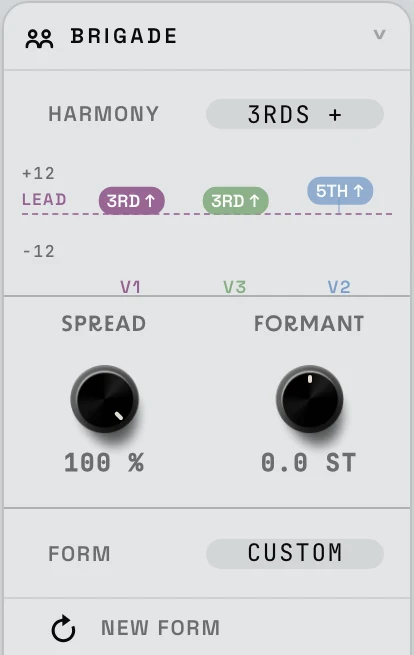
- Harmony: which notes the three sections sing around your lead: Thirds Up, Thirds Down, Octaves Up, Octaves Down, Unison, Deep or Full Stack. Click to step to the next one. The small ladder under it shows the interval of each section.
- Spread: how wide the singers stand in the stereo field.
- Formant: the color of the singers’ voices. Turn it down for deeper, bigger voices, up for lighter, smaller ones. The pitch stays the same.
- Form: how the singers stand. Rows spreads each section from near to far. Front puts everyone up front, spread wide. Moving singers by hand turns it into Custom.
- New Form: a fresh random arrangement, with new distances and positions for every singer.
Scroll down in the Brigade menu to reach Space, the reverb of the crowd.
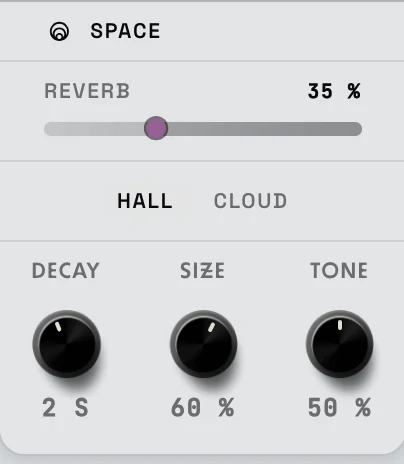
- Reverb: how much room the crowd gets.
- Hall or Cloud: Hall is a big concert hall, slow and smooth. Cloud is a moving cloud of echoes, deep and soft.
- Decay: how long the reverb rings.
- Size: how big the space is.
- Tone: darker to the left, brighter to the right.
Lead / Brigade fader
Section titled “Lead / Brigade fader”The long fader at the bottom sets the balance between your lead and the crowd. All the way left you hear mostly the lead, all the way right mostly the crowd.
Levels and header
Section titled “Levels and header”- IN and OUT (the small knobs under the meters) set the input and output level.
- In the header: the gear opens the settings, the % button sets the window size, and the arrows on the right are undo and redo.
Next: Tips
docs v0.0.14