Brigade
Brigade 1.0.18
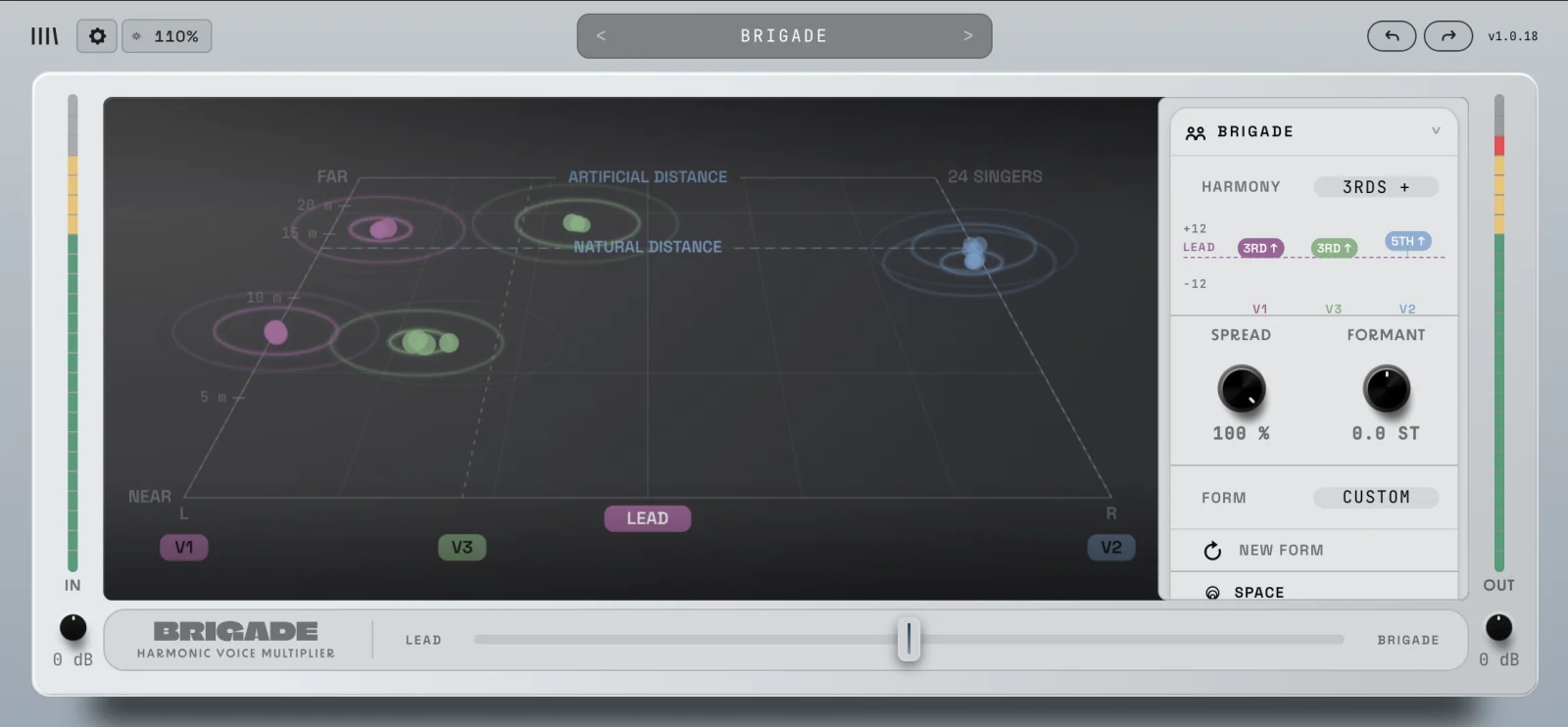
Brigade turns one voice into a group of singers. Put it on a lead vocal or a solo instrument and it builds three sections of singers around it in harmony, up to 24 singers in all. Every singer stands at their own place on a stage, a little left or right, nearer or further away, slightly out of step with the others. You hear an ensemble, not copies of the same voice.
Brigade is the crowd from Voicemax, as its own plugin.
What it is for
Section titled “What it is for”- Choir and gospel hooks: thirds or the full stack, the singers in rows, a big hall.
- Gang vocals and chants: unison, everyone up front, a short room.
- Backing pads: octaves down, lots of Cloud reverb, the crowd under the lead.
- Solo instruments: a sax, a violin or a synth line turns into a section.
Brigade follows one note at a time. On chords or a full mix the harmonies do not land where you expect, so use it on a single voice or a solo line.
The window at a glance
Section titled “The window at a glance”| Area | What you do there | Page |
|---|---|---|
| Header (top) | Settings, zoom, undo and redo | Controls |
| Stage (middle) | See and move the singers | The stage |
| Brigade menu (right) | Harmony, Spread, Formant, Form and the Space reverb | Controls |
| Lead / Brigade fader (bottom) | Set how loud the crowd is against your lead | Controls |
| IN / OUT (bottom corners) | Input and output level | Controls |
Quick start
Section titled “Quick start”- Put Brigade on your vocal track as an insert. A mono track works too: Brigade plays the crowd in stereo.
- Play the track. The singers light up on the stage as your voice comes in.
- Pick a Harmony in the Brigade menu, for example Thirds Up.
- Choose a Form: Rows or Front, or press New Form for a fresh arrangement.
- Pick Hall or Cloud under Space and set the Reverb.
- Move the Lead / Brigade fader until the crowd sits behind your lead.
Your license
Section titled “Your license”Brigade activates with a license key. You get the key by email after you order Brigade on our site. In the plugin click I have a license key, enter the email of your order and the key. See Activate your plugin.
Next: The stage
docs v0.0.14