The stage
The stage fills the middle of the window. Every dot is one singer.
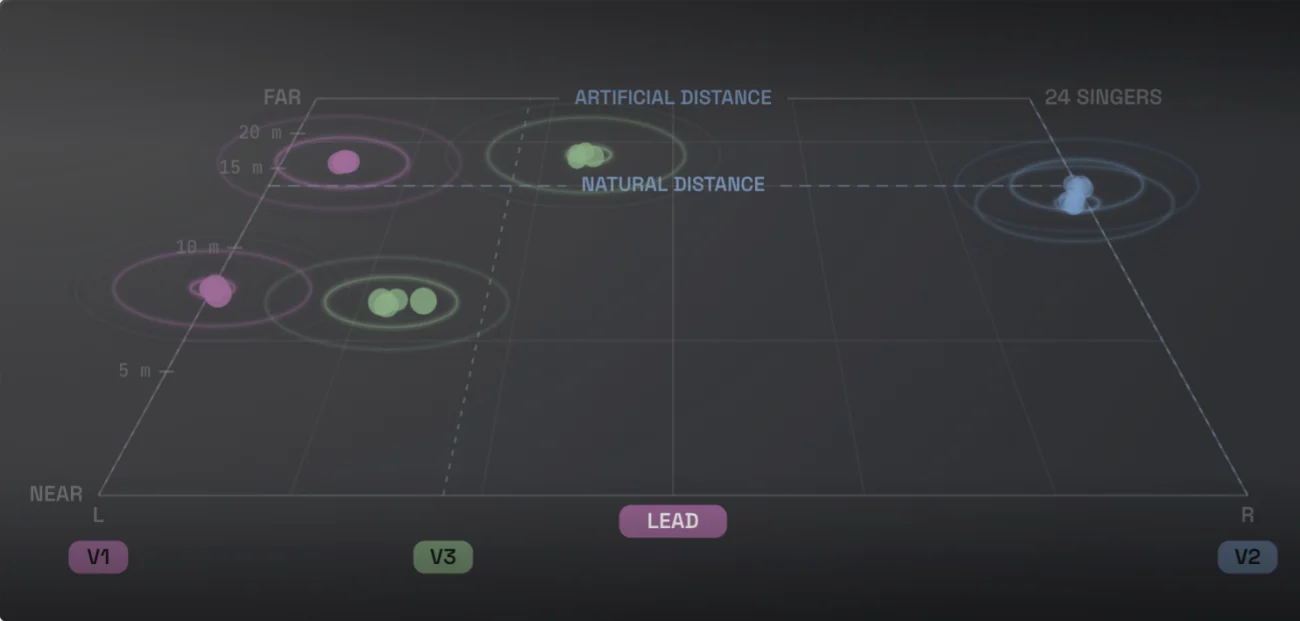
- Left and right is the stereo position of each singer.
- Near and far is the distance. A singer further back sounds later, quieter and darker, like in a real room. The dashed NATURAL DISTANCE line is where a real choir would stand. Above it the distance is exaggerated (ARTIFICIAL DISTANCE).
- The colored chips at the bottom (V1, V2, V3) are the three sections. Each section sings one harmony voice.
- The LEAD chip shows where your lead stands.
- The number at the top right shows how many singers are on the stage.
Moving singers
Section titled “Moving singers”- Drag a chip (V1, V2, V3) to move the whole section left or right. Double-click a chip to center it.
- Drag a single singer to place it by hand. The Form then turns into Custom.
- Right-click a singer and choose Solo to hear only that singer. Choose Unsolo to hear everyone again.
Next: Controls
docs v0.0.14