Vapor Dimension
Vapor Dimension 1.0
Vapor Dimension is a modulation effect inspired by classic hardware. It adds warm phasing, chorus and short echo movement to your sound, and it can make a mono-sounding source wide and alive. The whole plugin is built around two big knobs, TYPE and MODULATION, so you can get a result fast.
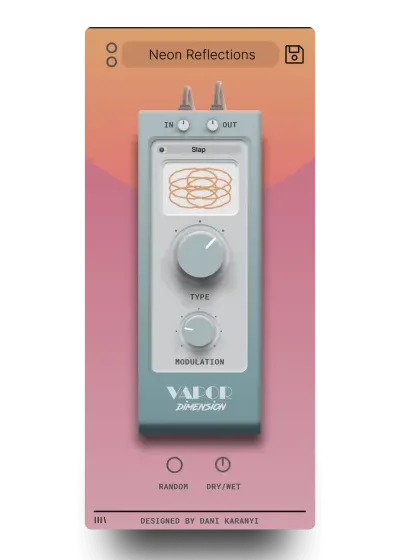
Behind the two knobs sit many ready-made sounds. Pick a preset, then shape it with TYPE and MODULATION. Set how much of the effect you hear with DRY/WET.
What it is for
Section titled “What it is for”- Vocals: a subtle widening that keeps the voice in front.
- Guitars and keys: classic chorus and phaser movement.
- Pads and synths: slow, wide motion and short repeats.
- Bass: a gentle chorus that adds width without losing the center.
The window at a glance
Section titled “The window at a glance”| Area | What it does | Page |
|---|---|---|
| Preset bar (top) | Step through presets, show the name, save your own | Presets |
| IN and OUT | Input and output level of the plugin | Controls |
| Display | Shows the name of the loaded sound and an animation | Controls |
| TYPE (big knob) | The main character and amount of the movement | Controls |
| MODULATION (small knob) | How wide and deep the movement gets | Controls |
| RANDOM | Tries a new sound | Controls |
| DRY/WET | The balance between your sound and the effect | Controls |
Quick start
Section titled “Quick start”- Put Vapor Dimension on a track as an insert. Use a stereo track for the full effect.
- Pick a preset from the preset bar at the top. Start with a name close to your goal, such as GUITAR CHORUS or VOX WIDENER.
- Turn TYPE to change the character of the effect.
- Turn MODULATION to make the movement wider.
- Use DRY/WET to set how much you hear.
- Want something unexpected? Click RANDOM.
If you need help with your serial number, see Activate legacy plugins.
Next: Controls
docs v0.0.14