Lofi Keys 2
Lofi Keys 2 1.0
Lofi Keys 2 is a keyboard instrument built for the lo-fi sound. It has three sound sources that play together: sampled Keys (pianos, electric pianos, Wurlitzer and clavinet sounds), sampled Synths, and Miniwave, a small wavetable synth. On top sit a noise layer (vinyl, tape and more), a Wow control for tape-style pitch drift, and three effect modules: Neural Amp, Neural Space and Vapor Dimension MK2.
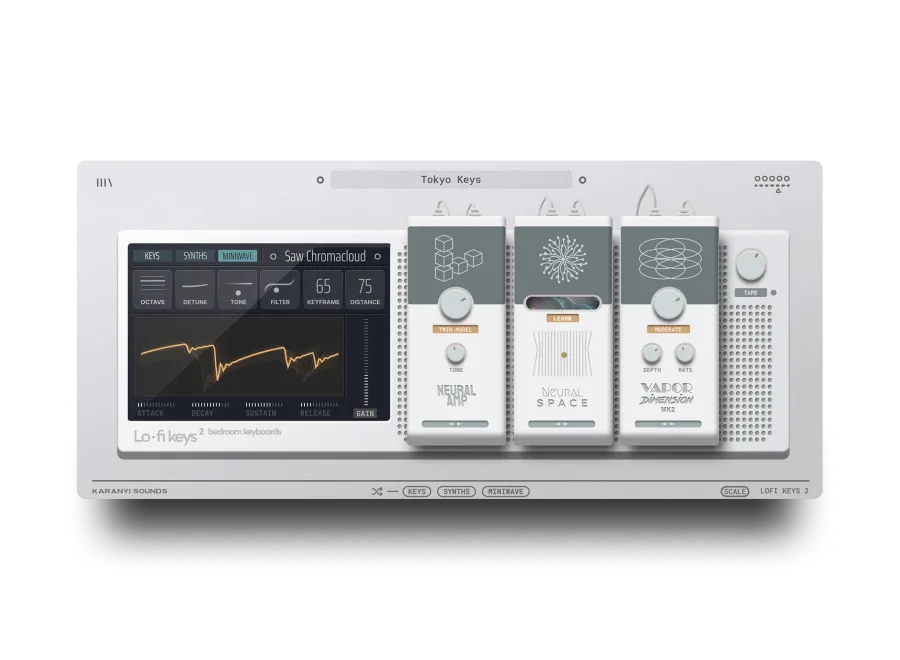
You pick a sound, play, and shape it with a few big knobs. Everything is on one screen, so you can find your way around in a minute.
What it is for
Section titled “What it is for”- Lo-fi and chill beats: dusty pianos and electric pianos with noise, wow and a worn amp sound.
- Chords and pads: soft synth layers and wavetable pads that move over time.
- Keys with character: layer a piano with a synth, set each level, and add space.
- Sound design: the wavetable source and the effect modules turn simple notes into textures.
The window at a glance
Section titled “The window at a glance”| Area | What it does | Page |
|---|---|---|
| Preset bar (top center) | Shows the preset name. Step through presets or open the preset browser | Presets |
| Screen tabs: KEYS, SYNTHS, MINIWAVE | Switch between the three sound sources | Controls |
| Screen controls | Octave, Detune, Tone, Filter, envelope and Gain of the selected source | Controls |
| Noise knob and Wow (right side) | The lo-fi noise layer and the tape-style wobble | Controls |
| Neural Amp | A neural amp model with three characters | Effects |
| Neural Space | A reverb with an XY pad and a LEARN button | Effects |
| Vapor Dimension MK2 | Chorus-style movement and a stereo widener | Effects |
| Bottom bar | Random buttons, SCALE and the Karanyi Sounds link | Controls |
Quick start
Section titled “Quick start”- Open Lofi Keys 2 on a software instrument track and play some notes.
- Click the preset name at the top and pick a sound. Tokyo Keys or Lofi Piano are good first picks.
- Click the KEYS, SYNTHS or MINIWAVE tab on the screen to see and change one source.
- Turn the knobs in the three effect modules to add amp warmth, space and width.
- Turn the noise knob up for dust, and WOW for a drifting tape feel.
- Want something unexpected? Press one of the random buttons in the bottom bar.
Next: Controls
docs v0.0.14